Transport order to Carrier
When the Cargo is registered to Expedition, the Cargo Manager sends a Transport Order - Contractagreement to the carrier by e-mail. This Contract is the basis for the transportation service.
OZOLS TMS prepares the contractagreement automatically, based on the information entered in the order and the information defined by your company. It is possible to add your signature and company stamp to the contract ( instructions here ).
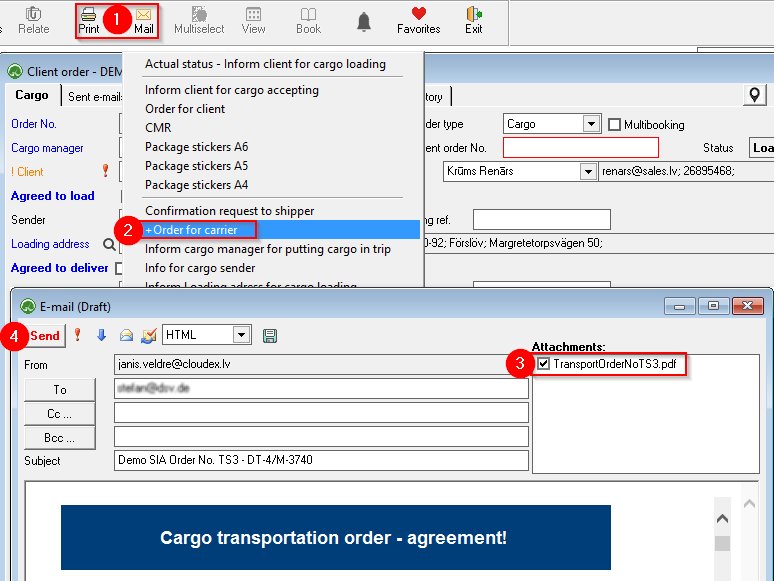
To send a Transport order - Contractagreement to the carrier:Carrier:
Usually, the Order is sent to the carrier by e-mail , but it is also possible to print it and send it in paper format. To view a preview of the invoice in PDF format, choose Print .
- Open the client's order
offor which you want to order carrier service and click Print or Mail in thecustomer for whom the shipment isordered and pressPrintorMailon the toolbar .toolbar. ChoosesChoose+Order for carrier- In the case of an e-mail, open the attachment and verify the correctness of the information.
SendsSendanthe email to thecarrier.carrier with Transport order in attachment.