Shortcuts to frequently used forms
QuickOpened accesswindows and Function key summary
1. Function keys
The function keys,keys descriptionsallow you to quickly open one of the OZOLS TMS sections

The most frequently used Function keys:
F6 - New Customer order
F7 - New Voyage/Expedition
F8 - Forwarder 's desktop
Function keys
Explanation
F2
 My favorites - a list of working modes compiled by myself
F3
 Information card of the cooperation partner
F4
 Machine/Trailer Details
F5
 Redrawing (refreshing) information in the open window
F6
 New Customer order
F7
 New Voyage/Expedition
F8
 Forwarder desktop
F9
Work with debtors
F11
Saving and adding information
F12
Retention and Closure of Information
If the Function keys do not work , press Fn + Esc on the keyboard
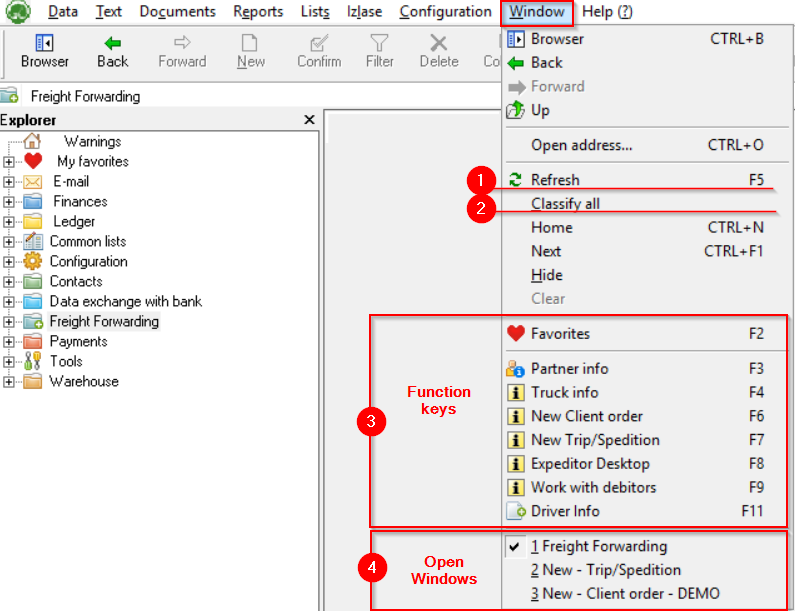
2. Opened windows and Function key summary
- Update data in the currently open window (F5)
- Arrange all creates a cascade of open windows. This allows you to quickly switch between open windows
- Shortcuts to function keys
- Opened windows - Helps to find collapsed windows
3. General key combinations in OZOLS TMS