6.5. Outgoing invoice payment - automated data import from Bank
Important! OZOLS TMS provides two options - manual and automated outgoing invoice payment.
Only one of options can be used for the accounting period!
1. Export Account report from your Bank
Open your company's internet bank > prepare the Bank Account report for the desired period > export it in FidaVista or ISO format. > Save this document to your computer.
2. Open OZOLS TMS
> Documents
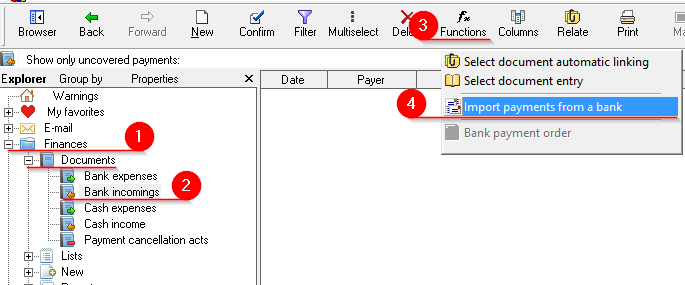
3. Import bank payments

4. Linking incoming bank payments with outgoing invoices
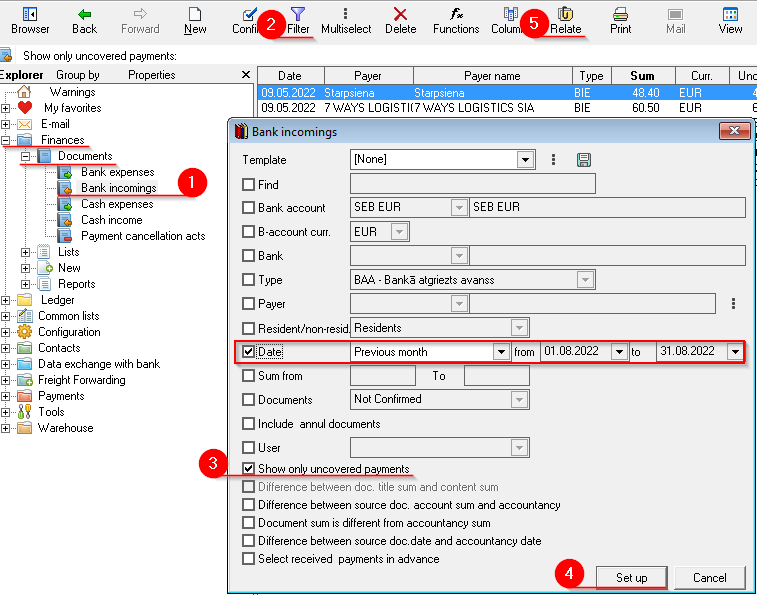
 > choose which documents to
  "Relate" button (Ctrl+D)
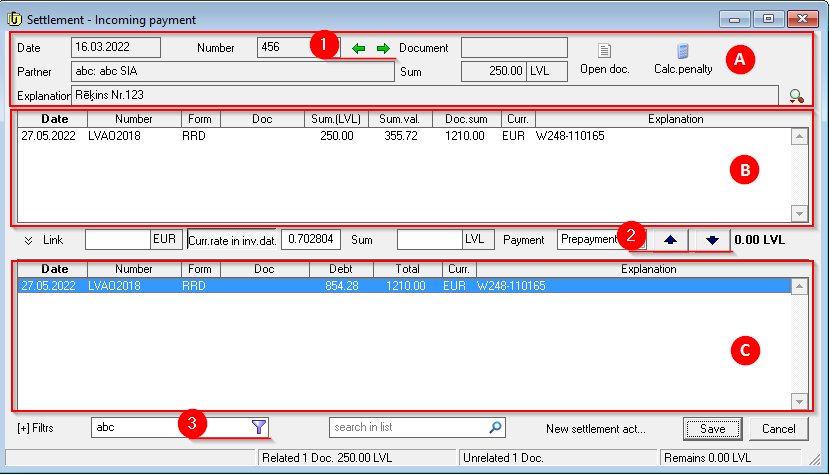
Settlement - Incoming payment window consists of 3 areas:
A) Incoming bank payment
B) Covered invoices
C) Uncovered invoices
5) In the lower list (C) we find the invoices that have beenunpaid paidinvoices. andTo highlightrelate thempayment (ifwith there are several invoices, then holding down the Ctrl key) -> invoice Press the "Blue arrow up" (1) or double-click on invoice to relate it. If there are several invoices, select them by holding the Ctrl key
6) With green arrows (1) switch between incoming payment documents
7) With the filter (4)3), ityou is possible tocan quickly find the required invoice by number, amount, etc.
When the Incoming Payment is linked to the corresponding invoice, the amount in the "Uncovered" column in the Bank incomings list will be zero.