2) Multiple loading or delivery addresses - Multibooking
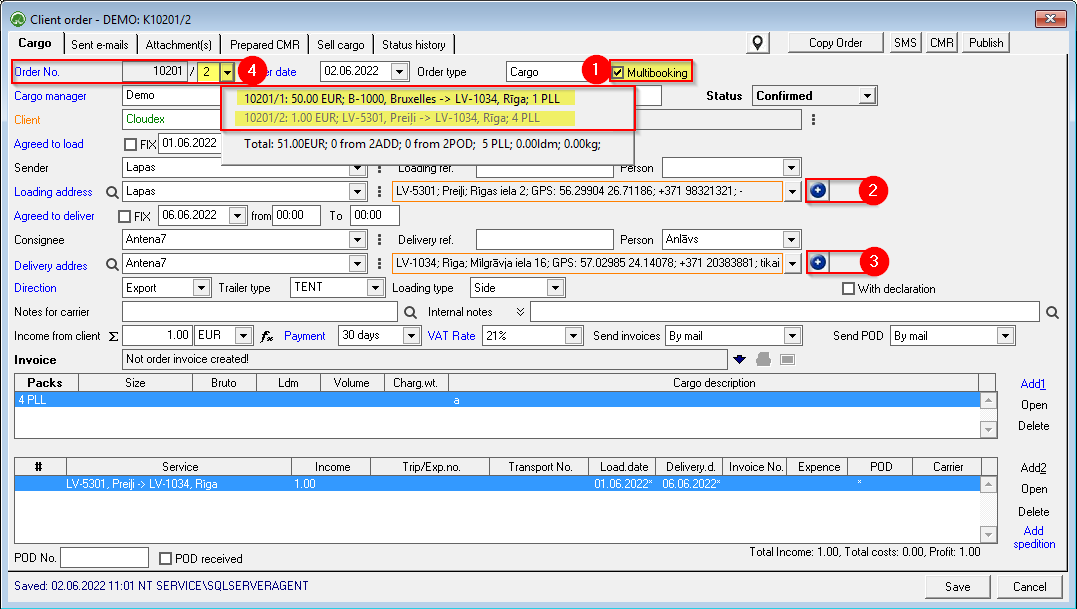
Multibooking is used when there are several loading or delivery addresses in one client order.
- Check Multibooking
 ;
; - Click
 to add additional loading addresses ;
 - Click
 to add additional unloading addresses ;
 - The order number is assigned a sub-number. You can switch between multibooking orders by pressing
 .
.


The following must be done for each Multibooking cargo separately:
1. Description of the Cargo
2. ExistingAdded to existing or new Trip/ speditionSpedition
3. If Multibooking order is fulfilled by several carriers,carriers, the income from the customer must be specified for each shipment.
4.

Once the Multibooking order has been entered, every part of it must be added to the Trip / Expedition that will deliver it!