Delivery via TERMINAL
1) How to create Terminal
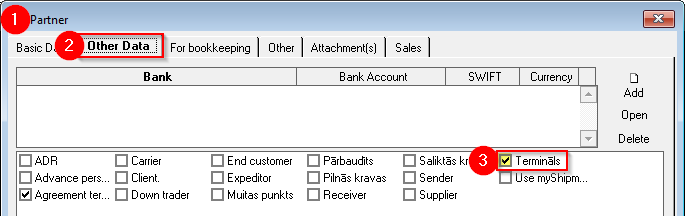
The Cooperation Partner who provides terminal/warehouse services must have the "Terminal" mark in the Partner's card.
OZOLS > Contacts > Lists > All partners > Partner card
- In the partner card
- Open Other data
- Mark the group "Terminal"
2) Delivery via terminal
1. Open the Client's order, which must be sent through the terminal
2. In the list of services, select the command button Add2 ( 1) > Delivery through the terminal (2)

The numbers of the Services included in the order
1) The number of the basic service, or the main Voyage/Expedition,Trip/spedition, is " 0 0 " and and is not reflected shown (Its field is empty) ;
2) Additional transportation before the main flight hastrip ais with minus sign;
- Delivery from the loading address to the terminal (pick up) # -1; #-2
3) Additional shipments after the main flight trip are positive numbers
- Delivery from the terminal to the delivery address (domestic) # 1; # 2
4) Additional services , such as customs, insurance, etc. are numbered from ten # 10; #11...
3. Choose at which stagepart of delivery the terminal will be used:
A. Delivery from the loading address to the terminal (1)
B. Delivery from the terminal to the delivery address (2)
4. For the terminal:
- Terminal: Name and address;
- Planned delivery to the terminal: Date, time;
- Revenue : the amount that is diverted from the basemain flighttrip revenue to this local flight.trip.
- Local delivery expenses: If the expenses are not yet known, then this amount can be entered later.
5. Voyage/Exped. Trip/sped. no.: If itpossible, is known who will deliver the cargo locally, thenadd the Cargo is added to a new or existing Voyagelocal / Trip/Expedition. More about it here .

How to simultaneously mark several loads for delivery through the terminal?
A. In the Voyage/ExpeditionTrip/spedition window > Hold the Ctrl key with the mouse to mark the loads that will go through one terminal > Add > Delivery through the terminal
B. Forwarder'Expeditor's desktop (F8) > "Planning"General planning" page > Right mouse button on the selected load > Delivery through the terminal