4) Signature with stamp on orders and invoices
SkanētsA zīmogsscanned arstamp parakstuwith visbiežāksignature tiekis izmantotsmost Klientacommonly pasūtījumu,used Transportafor pasūtījumu,Customer SavstarpējoOrders, rēķinuTransport dzēšanasOrders, aktosPayment uncancellation Savstarpējoacts rēķinuand salīdzināšanasReconciliation aktosacts
PirmsTo pievienotadd parakstua arsignature zīmoguwith a stamp in OZOLS TMSTMS, sistēmā,it tasmust irbe jānoskanēscanned unand jāsaglabāsaved in .png formātā.format. ŠīThe attēlamaximum maksimālaisheight augstumsof nedrīkstthis pārsniegtimage must not exceed 135px. LaiTo todo paveiktu,this, lūdzuplease sekotfollow sekojošajiemthe norādījumiem:instructions below:
- 1)
UzStampbaltasandlapassignuzspiedietazīmoguwhiteunsheetparakstieties.ofParakstapaper.izmērsThenedrīkstsizepārsniegtofzīmogatheapakšējosignatureunmustaugšējonotmalu.exceed the bottom and top edges of the stamp. (skatītseeattēlālightgaišibluezilofieldlauku)in sample image below). - 2)
LapuScannoskanējietthe page as a JPGattēlaimageformātāandunsavesaglabājietitdatorā.in your computer.

- 3)
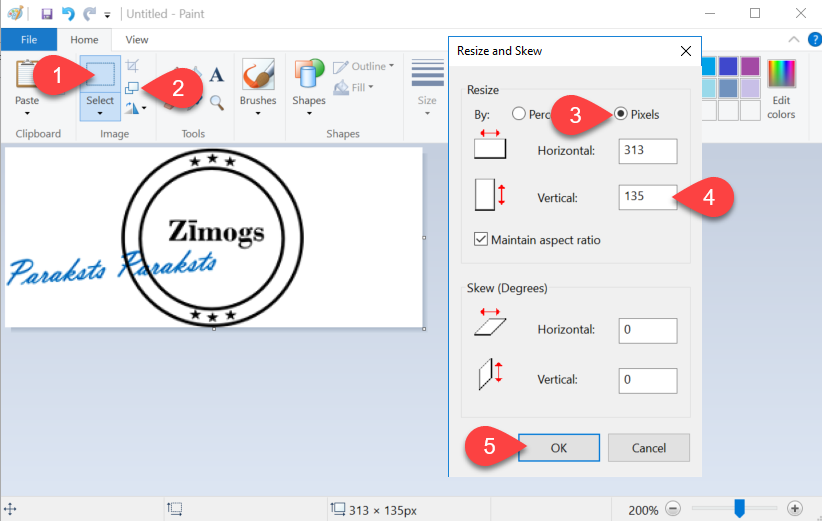
AtverietOpendokumentuthe document in Paintprogrammāskatītseeattēluimagezemākbelow ).IiezīmējietResize ①unandizveidojietmakepēctheiespējasimagevertikāliasšaurākuverticallyattēlu,narrowkurāasietilpstpossible,parakstsincludingunthezīmogssignature and the stamp - 4)
ArUsing the Resize and Skewfunkcijufunction②②,izmainietresizeatēlathevertikāloimageizmēruverticallyuzto 135Pixels.Pixels ③ ④. - 5)
IzveidotoSaveattēluthesaglabājietcreateddatorāimage to your computer in PNGformātā.format.
Further Turpmākāssteps darbībashave veicamasto be done in Ozols TMS programmā!TMS!
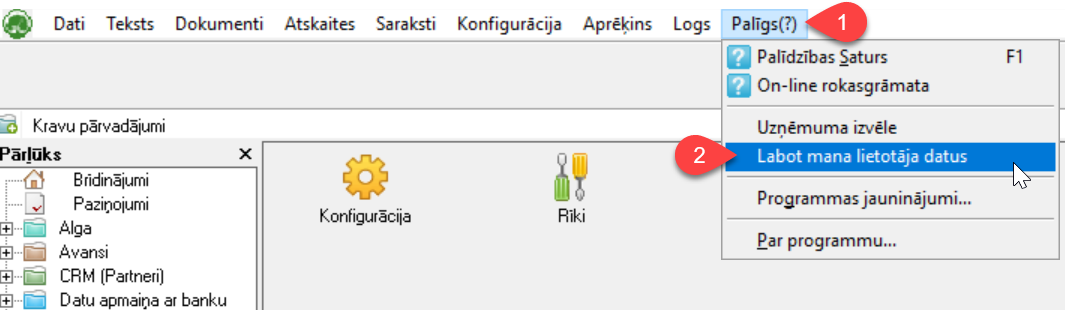

3) spiedietclick poguthe button - skanētsscanned parakstssignature

- 4)
spiedietclickpoguthe button -DokumentsDocumentvaiorfailsfile - 5)
IzvēlietiesSelectPersonasSignatureparakstswithar zīmogustamp

- 6)
SpiedietpogumeklētClickunthepievienojietsearchiepriekšbuttonskanētoandunaddsagatavototheattēlupreviously scanned and prepared image (izmērssizevertikālivertical 135px). - 7)
SaglabātSave