1. All companies involved in the business are called cooperation partners 2. Partners can be divided in groups that you define in advance or OZOLS TMS defines it automatically.
##### OZOLS TMS automatically divides into the following groups:| **Group** | **In which case OZOLS TMS marks the partner in the group** |
| Approoved | If the partner's VAT number can be found in the EU VAT register |
| Client | If the Customer's order is registered on the partner |
| Carrier | If a Trip/Spedition is registered to a partner |
| Sender | If a partner is selected as the sender in the Customer's order |
| Recipient | If a partner is selected as the recipient in the Customer's order |
Users can manually create and assign partners to other groups.
#### To see or change the group of Partner: 1. Open Partner card 2. Choose page- Other data 3. The check mark indicates to which group the partner is added [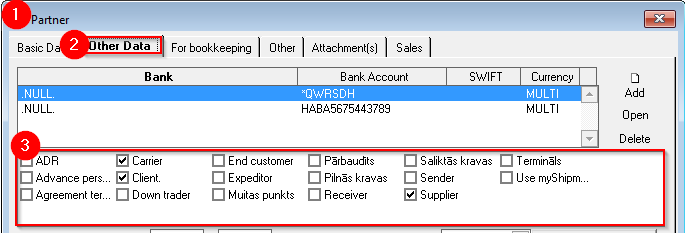](https://ozols.lv/doc/uploads/images/gallery/2022-08/image-1661758604252.png)Partners can be filtered by group in the reports and in the list of partners.
Some of the more frequently used **groups of partners** and contacts : Forwarding company, Final (direct) customer, Combined loads, Full loads, Send holiday greetings, Send information about promotions, etc.