# Unrelate a payment from an outgoing invoice
Sometimes it is necessary to unrelate a payment from an outgoing invoice. To do this, the following steps are required:
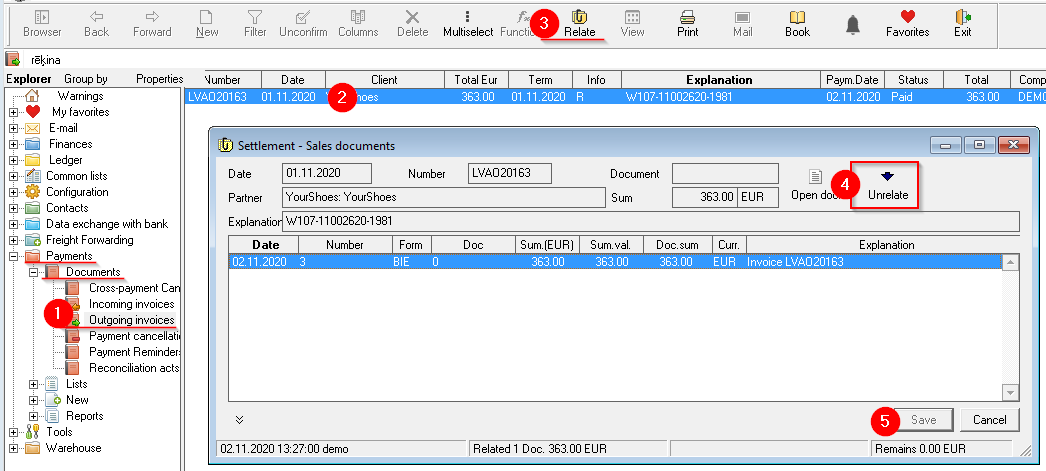
1. **OZOLS > Payments > Documents > Outgoing invoices**
2. **Mark the invoice** for which payment should be unrelated
3. Click **Relate [](https://doc-ozols-lv.translate.goog/uploads/images/gallery/2020-10/ico-saistit.gif?_x_tr_sl=lv&_x_tr_tl=en&_x_tr_hl=en&_x_tr_pto=wapp)** in **the toolbar**
4. In the Billing - Sales documents window, select **Unrelate**[](https://doc-ozols-lv.translate.goog/uploads/images/gallery/2022-04/image-1651154858190.png?_x_tr_sl=lv&_x_tr_tl=en&_x_tr_hl=en&_x_tr_pto=wapp)
5. Save changes.
[](https://ozols.lv/doc/uploads/images/gallery/2022-10/image-1666685197892.png)
If the payment is unlinked with the intention of making corrections to the payment order, then the **payment must be re-added to the invoice** afterwards . You will find the [instructions here](https://ozols.lv/doc/link/231#bkmrk-4.-ien%C4%81ko%C5%A1o-bankas-m)