**You can also create Trip/spedition:** - **Agreement** - Long-term contract with the carrier - **Own trip** - Trip with own transport - **Domestic** - Local transport
2. If the haulier's car has already carried cargo, entering its number will automatically fill in the Carrier name. 3. Enter the Carrier company name, if you have it. Double-click to enter a new Carrier. 4. If you know, enter Carrier Manager. Double-click to enter a new one. 5. Carrier Price: The amount that will be paid to the Carrier. Specify the VAT rate and payment term 6. Mark the trailer type (For example – TENT) 7. Internal notes if needed 8. Save and close. With that, the Expedition is created. [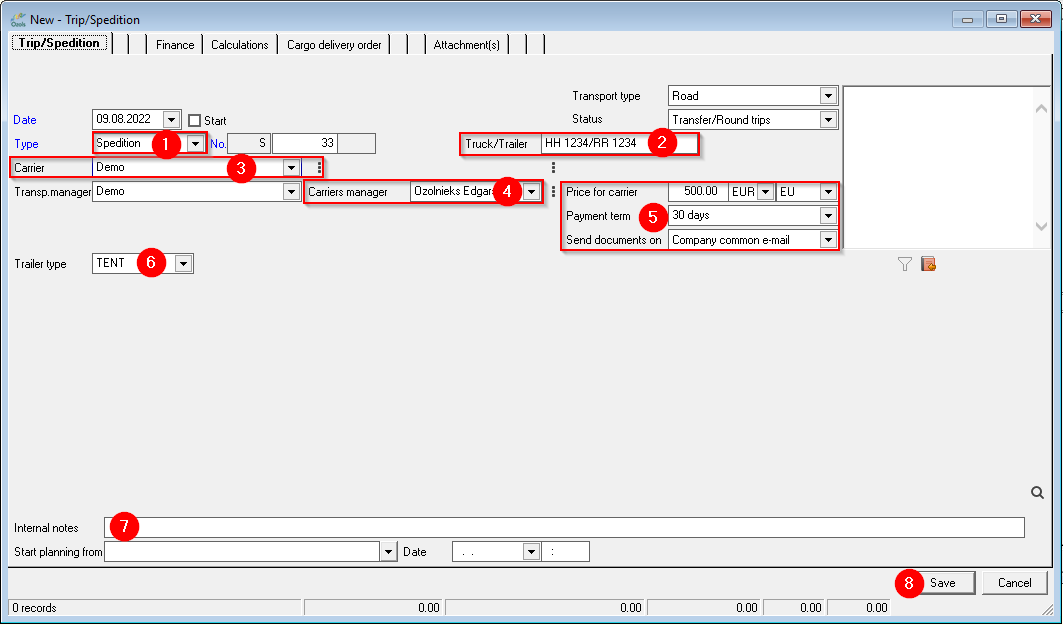](https://ozols.lv/doc/uploads/images/gallery/2022-08/image-1660038864115.png) ##### Next steps: ##### [**Transport Order** to cargo carrier](https://ozols.lv/doc/books/ozols-tms-english/page/2-transport-order-to-carrier) ##### [**Invoice** to Client](https://ozols.lv/doc/link/166#bkmrk-page-title)