**Multibooking** is used when there are several loading or delivery addresses in one client order.
1. Check Multibooking [ ](https://doc-ozols-lv.translate.goog/uploads/images/gallery/2022-04/image-1649076856190.png?_x_tr_sl=lv&_x_tr_tl=en&_x_tr_hl=en&_x_tr_pto=wapp); 2. Click [](https://doc-ozols-lv.translate.goog/uploads/images/gallery/2022-04/image-1649076970307.png?_x_tr_sl=lv&_x_tr_tl=en&_x_tr_hl=en&_x_tr_pto=wapp)to add additional **loading addresses** ; 3. Click to add additional **unloading addresses** ; 4. The order number is assigned a sub-number. You can switch between multibooking orders by pressing [](https://ozols.lv/doc/uploads/images/gallery/2022-06/image-1654262701607.png). [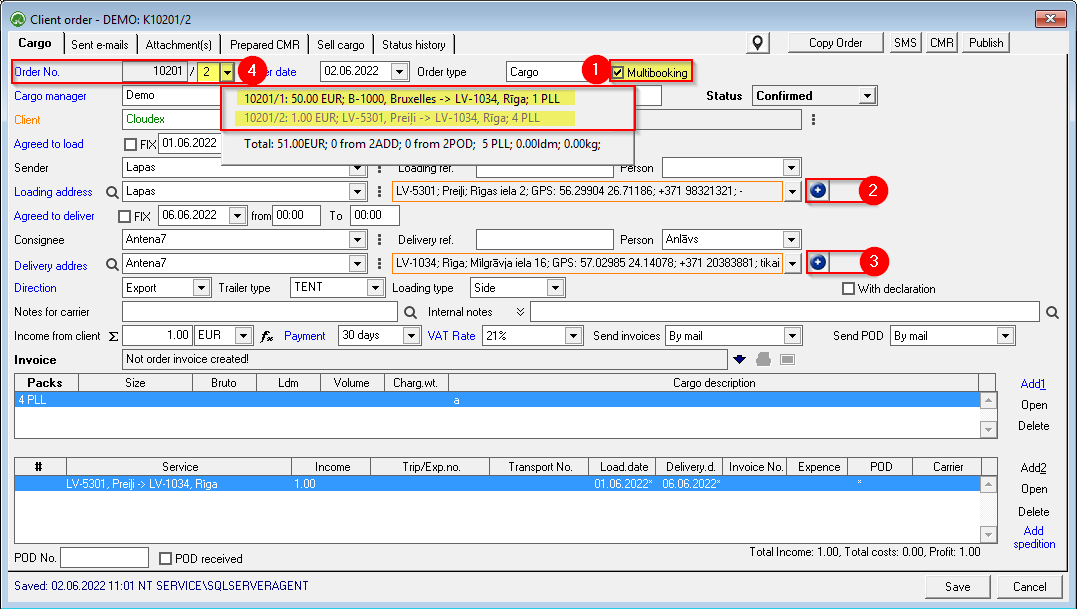](https://ozols.lv/doc/uploads/images/gallery/2022-09/image-1662127072437.png)The following **must be done for each Multibooking cargo** separately: 1. **Description of the Cargo** 2. Added to existing or new **Trip/Spedition** 3. If Multibooking order is fulfilled by **several carriers**, the **income** from the customer must be **specified** for each shipment. 4. Once the Multibooking order has been entered, **every part of it must be added to the Trip / Expedition** that will deliver it!
[](https://doc-ozols-lv.translate.goog/uploads/images/gallery/2022-04/image-1649420968740.png?_x_tr_sl=lv&_x_tr_tl=en&_x_tr_hl=en&_x_tr_pto=wapp)