To simplify the entry of fixed costs into Ozols TMS, we recommend creating an Excel spreadsheet that can be imported into the database.
1\. Create an Excel spreadsheet containing the required information. For example: MTPL, CASCO, leasing or other fixed costs.• The data in the Excel file is grouped into 6 columns - according to the example below. • The first row must contain the column names. • There must be no other empty columns between these 6 columns. • The type names must correspond exactly to the defined position names! • Date must be in the format dd.mm.yyyy
[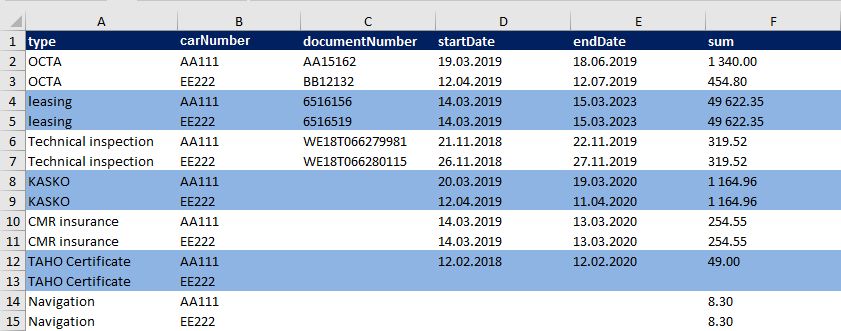](https://doc-ozols-lv.translate.goog/uploads/images/gallery/2022-02/izdevumi-fix-xls-2.png?_x_tr_sl=lv&_x_tr_tl=en&_x_tr_hl=en&_x_tr_pto=wapp) 2. The prepared Excel spreadsheet is sent to Ozols TMS specialists by e-mail: