Before deleting the Client order, make sure that it would not be more correct to change the order status to - **Cancelled**. Read more about changing the order status [here](https://ozols.lv/doc/books/ozols-tms-english/page/cargo-status) .
1. Open the Client order you want to delete. 2. Press Delete and select **Delete Client Order No ...** [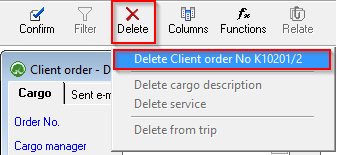](https://ozols.lv/doc/uploads/images/gallery/2022-09/image-1662464731480.png)If **an invoice has already been created** for the Client order, program will not allow the order to be deleted!
##### To delete the order with invoice: 1. **Open the prepared invoice,** 2. **Cancel the confirmation of invoice** 3. **Delete the Invoice**. 4. Now it is possible to **delete a customer's order.**