Almost all sections of OZOLS have the possibility to set a **Filter** for selecting the data you need. The **Filter** is located in the toolbar.
[](https://ozols.lv/doc/uploads/images/gallery/2022-09/image-1662035091447.png)If all records are not displayed when opening one of the OZOLZ TMS sections, make sure that one of the filters has not been **turned on from the previous use**.
- To find a document by number, it is enough to enter **the last two digits of the number.** - **% sign** in front of the entry enables search for partial number or name. - To select **several order numbers** , enter them in the "Search number(s)" field, **separated by a comma.** - **A checkmark[](https://doc-ozols-lv.translate.goog/uploads/images/gallery/2022-07/image-1658824626308.png?_x_tr_sl=lv&_x_tr_tl=en&_x_tr_hl=en&_x_tr_pto=wapp)** turns on the specific filter [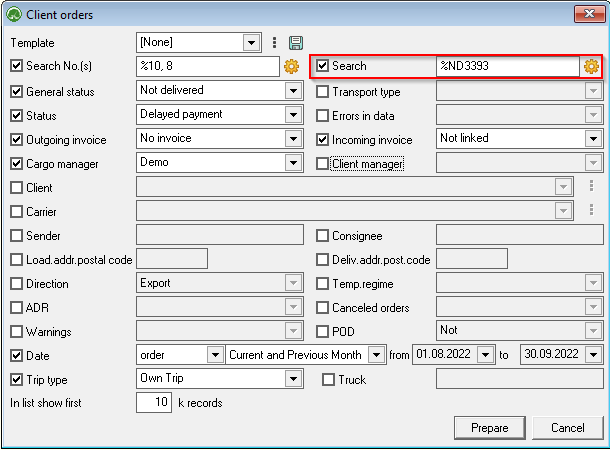](https://ozols.lv/doc/uploads/images/gallery/2022-09/image-1662105184357.png)**The additional Search** function built into the filter on the right side of window allows you to enter additional search criteria. More about search options [here.](https://ozols.lv/doc/books/ozols-tms-english/page/search-window)