If your company has a contract with a company that provides factoring services and you want to apply Factoring to the Partner:
##### 1. Create a bank account group called Factoring for your company 1. **OZOLS > Payments > Lists > Bank account groups** 2. Add... New Bank account group named **Factoring** **without ****specifying the account number!** [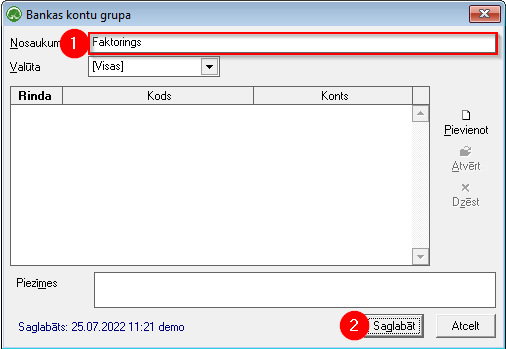](https://doc-ozols-lv.translate.goog/uploads/images/gallery/2022-07/image-1658826328840.png?_x_tr_sl=lv&_x_tr_tl=en&_x_tr_hl=en&_x_tr_pto=wapp) ##### 2. When an invoice is issued: 1. Open the outgoing invoice 2. Press the Seller button 3. Selects Bank account Group – Factoring and close the window 4. Press the search button 5. Select **New note**. (If the noteFactoring has already been created, select it.) 6. When creating a new one, name the note - Factoring 7. In the Description field, enter information about Factoring rules. 8. This field is filled automatically from the defined note (5) information and is included in the lower part of the invoice in red letters 9. The created invoice is sent to the Partner and Factoring service provider. [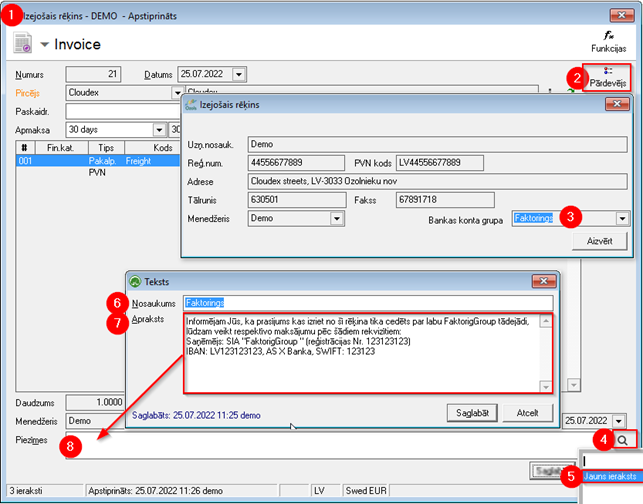](https://doc-ozols-lv.translate.goog/uploads/images/gallery/2022-07/image-1658826442289.png?_x_tr_sl=lv&_x_tr_tl=en&_x_tr_hl=en&_x_tr_pto=wapp)