Companies that use OZOLS TMS can exchange order information automatically using reference number.
#### 1) Sending cargo information to partner 1. Press **Mail** or **Print** 2. Choose – **Order for carrier** 3. The system will prepare e-mail, with attached CARGO TRANSPORTATION ORDER – AGREEMENT [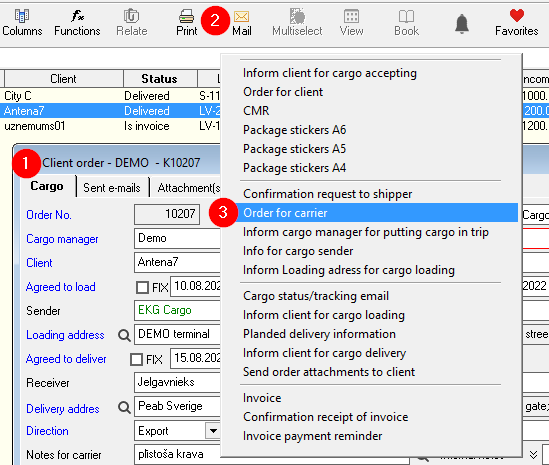](https://ozols.lv/doc/uploads/images/gallery/2022-08/image-1660651157650.png) 4. The **number** of CARGO TRANSPORTATION ORDER – AGREEMENT **is the cargo reference number**[](https://ozols.lv/doc/uploads/images/gallery/2022-08/image-1660651224464.png)Number of this agreement is the **reference number for the cargo information**
#### 2) Receiving of cargo information from partner 1. When creating **new client order**, 2. Enter the name of the **Client**, 3. Enter the number of Cargo Transport order - agreement = **Client order No** 4. OZOLS TMS will offer you to fill the information from Partner automatically. [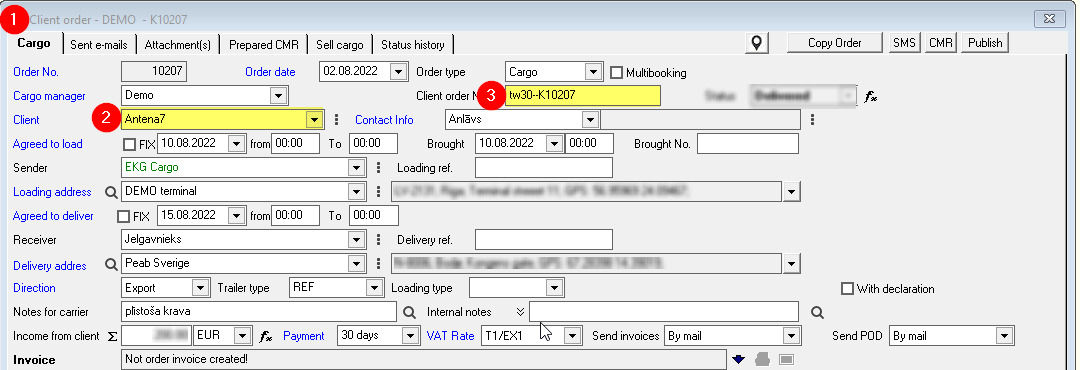](https://ozols.lv/doc/uploads/images/gallery/2022-08/image-1660651502881.png)ATTENTION! Some OZOLS TMS user companies have disabled this option.
#### 3) To check the status of Cargo information exchange: [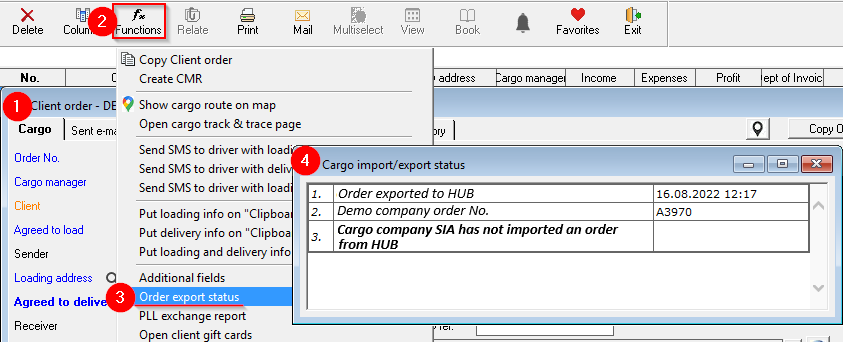](https://ozols.lv/doc/uploads/images/gallery/2022-08/image-1660655243960.png)