**The Cooperation Partner** who provides terminal/warehouse services must have the **"Terminal" mark** in the Partner's card.
**OZOLS > Contacts > Lists > All partners > Partner card** 1. In the partner card 2. Open Other data 3. Mark the group "Terminal" [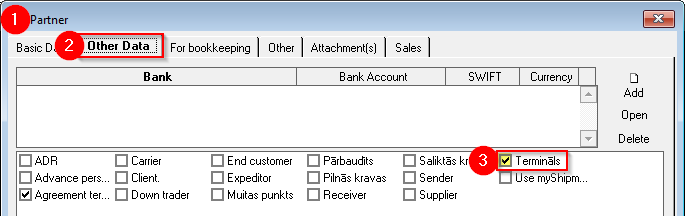](https://ozols.lv/doc/uploads/images/gallery/2022-08/image-1660907678508.png) #### 2) Delivery via terminal 1\. Open the **Client's order**, which must be sent through the terminal 2\. In the list of services, select the command button Add2 **(** 1) > **Delivery through the terminal** (2) **The numbers of the Services included in the order** 1) **The number of the main Trip/spedition, is " 0 " and is not shown (Its field is empty)** ; 2) Additional **transportation before the main** trip is with **minus** sign; - Delivery from the loading address to the terminal **(pick up)** # -1; #-2 3) Additional **shipments after the main** trip are positive numbers - Delivery from the terminal to the delivery address **(domestic)** # 1; # 2 4) Additional **services** , such as customs, insurance, etc. are numbered from ten # 10; #11...
3. **Choose** at which part of delivery the terminal will be used: A. Delivery from the loading address **to the terminal** (1) B. Delivery from the terminal **to the delivery address** (2) 4\. For the terminal: - **Terminal:** Name and address; - **Planned delivery to the terminal:** Date, time; - **Revenue** : the amount that is diverted from the main trip revenue to this local trip. - **Local delivery expenses:** If the expenses are not yet known, then this amount can be entered later. 5. **Trip/sped. no.:** If possible, add the Cargo to a new or existing local Trip/Expedition.[here](https://doc-ozols-lv.translate.goog/link/112?_x_tr_sl=lv&_x_tr_tl=en&_x_tr_hl=en&_x_tr_pto=wapp#bkmrk-page-title) . [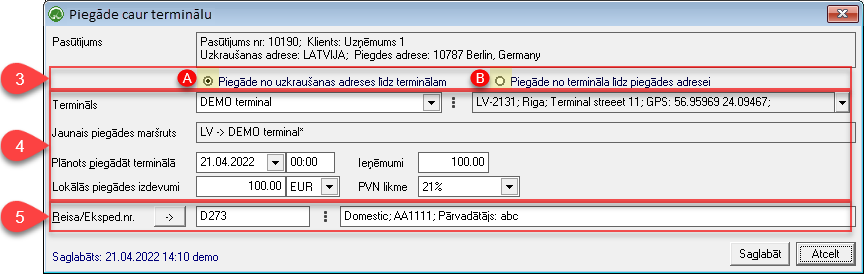](https://doc-ozols-lv.translate.goog/uploads/images/gallery/2022-04/image-1650632367081.png?_x_tr_sl=lv&_x_tr_tl=en&_x_tr_hl=en&_x_tr_pto=wapp)**How to simultaneously mark several loads for delivery through the terminal?** A. In the **Trip/spedition window** > Hold the Ctrl key with the mouse to mark the loads that will go through one terminal > Add > Delivery through the terminal B. **Expeditor's desktop** (F8) > "General planning" page > Right mouse button on the selected load > Delivery through the terminal