Outgoing documents can include the Partner's contact details in a foreign language. To set this : 1) Indicate the preferred language of contact on the Client Card; 2) Translation of the contact details.
**Ozols > Contacts > Lists > All partners > \[Open Partner card\]** ##### Translation is available for the following fields of the Partner card: 1. Company Name 2. Contact person 3. Address [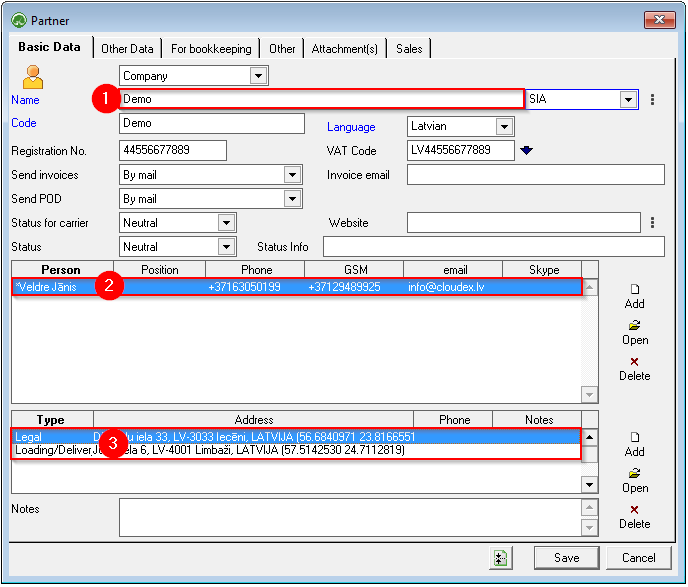](https://ozols.lv/doc/uploads/images/gallery/2022-10/image-1666604037076.png) ##### To enter a translation: 1. Select the desired field and press **the right mouse button** ; 2. A window opens in which you choose **translate** ; 3. **Make an entry** in the desired language and save. [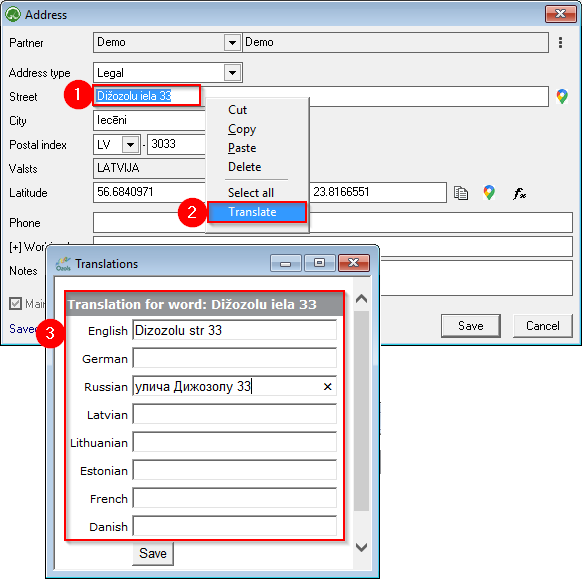](https://ozols.lv/doc/uploads/images/gallery/2022-10/image-1666604687973.png)In future outgoing documents, OZOLS TMS will insert contact information in the Partner's language.
#### See also: Information in the client's language - foreign language Contract terms in the customer's foreign language