OZOLS TMS allows you to select individual rows in the table in order to sum the numbers in these rows.
1. In the toolbar, select **Multi Select.** (shortcut **Ctrl+Y)** 2. Then, similar to Excel, holding the **Ctrl** or **Shift** keys with the "mouse" selects the desired rows 3. **The sums of the highlighted rows are shown in the lower part of the table** 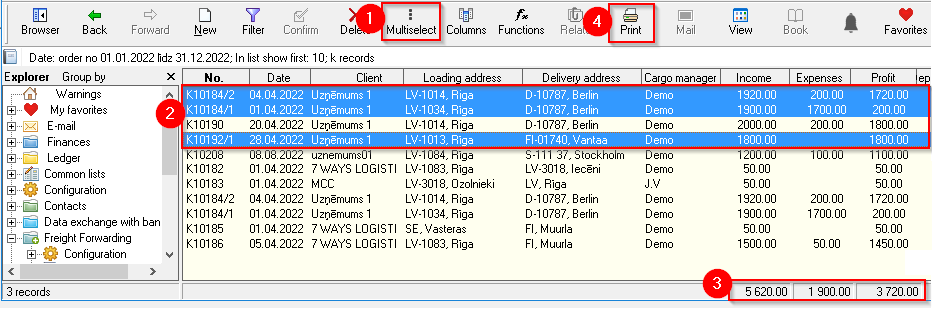**See also:** [1) Option to print or export highlighted rows **to Excel** ](https://doc-ozols-lv.translate.goog/books/ozols-desktop/page/drukat-vai-eksportet-uz-excel-tikai-jums-vajadzigos-datus?_x_tr_sl=lv&_x_tr_tl=en&_x_tr_hl=en&_x_tr_pto=wapp)[. Press Print ④ and follow the instructions.](https://doc-ozols-lv.translate.goog/books/ozols-desktop/page/drukat-vai-eksportet-uz-excel-tikai-jums-vajadzigos-datus?_x_tr_sl=lv&_x_tr_tl=en&_x_tr_hl=en&_x_tr_pto=wapp) 2) **Additional options,** depending on the opened window, by pressing the **Functions command button**