Ferry tickets can be added to a **specific trip** or sold as **a additional service**
#### 1. Adding a ferry ticket **to a Trip/Spedition** 1\) Open the Trip/Spedition to which you need to add ferry tickets; 2\) Select **Export ferry** as needed and click [](https://doc-ozols-lv.translate.goog/uploads/images/gallery/2022-04/image-1651154858190.png?_x_tr_sl=lv&_x_tr_tl=en&_x_tr_hl=en&_x_tr_pto=wapp) to **add ferry** or o**pen an existing** one; 3\) Select **Import ferry** as needed and press [](https://doc-ozols-lv.translate.goog/uploads/images/gallery/2022-04/image-1651154858190.png?_x_tr_sl=lv&_x_tr_tl=en&_x_tr_hl=en&_x_tr_pto=wapp)to **add ferry** or **open an existing** one.[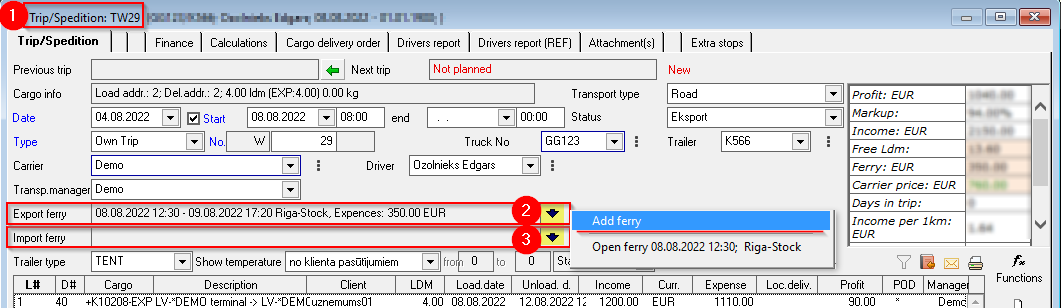](https://ozols.lv/doc/uploads/images/gallery/2022-08/image-1661950374675.png) #### 2. Filling in the **Ferry** window: 1) **Attach ferry to a trip** : complete if the ferry tickets are for a specific Trip; 2) **Car/Trailer number: mandatory;** 3) Ferry route: **mandatory**; With a double click, the **Ferry Route** window opens , where you enter the required information. If the information has already been entered, press [](https://doc-ozols-lv.translate.goog/uploads/images/gallery/2022-04/image-1651154764507.png?_x_tr_sl=lv&_x_tr_tl=en&_x_tr_hl=en&_x_tr_pto=wapp), and select previously defined ferry; 4) **!!! IMPORTANT:** indicate the direction of the ferry - **Import, Export or Crossing** ; 5) **Sale price:** This window is filled in if the ferry ticket is not attributed to Trip, but is sold as additional service for which an invoice must be issued; 6\) **SMS to the driver:**copy Ferry ticket information for sending to the driver (Clipboard) 7\) When the **Invoice** for tickets is available, add it by clicking here[](https://doc-ozols-lv.translate.goog/uploads/images/gallery/2022-04/image-1651154858190.png?_x_tr_sl=lv&_x_tr_tl=en&_x_tr_hl=en&_x_tr_pto=wapp); - The other fields are filled depending on the available information. [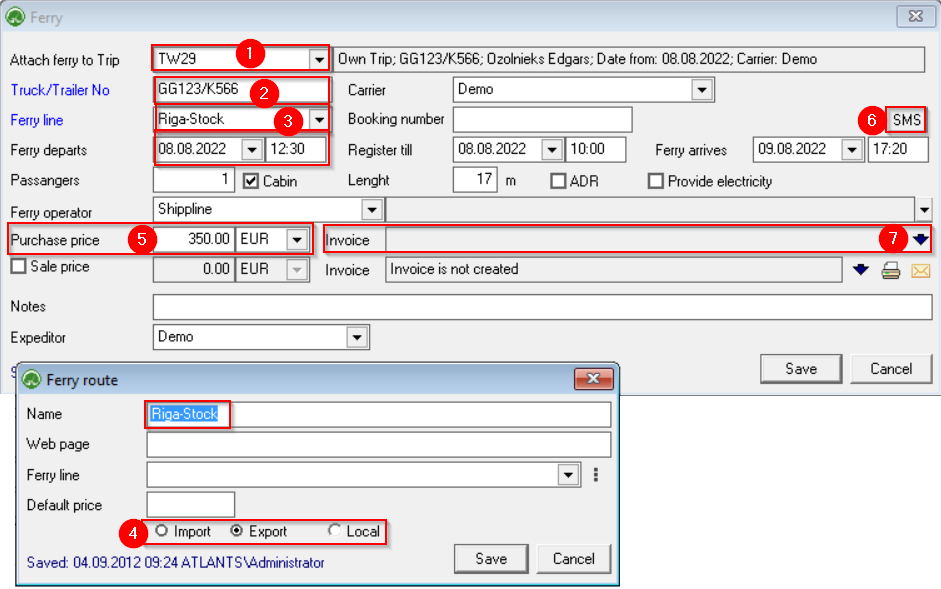](https://ozols.lv/doc/uploads/images/gallery/2022-09/image-1662374214041.png)[How to add Invoice for Ferry tickets?](https://doc-ozols-lv.translate.goog/books/ozols-desktop/page/rekins-par-pramja-biletem?_x_tr_sl=lv&_x_tr_tl=en&_x_tr_hl=en&_x_tr_pto=wapp)