# 5) E-mail settings

<p class="callout info">To send emails from OZOLS TMS, you need to enter your **e-mail address** and **e-mail password** in system.</p>

<p class="callout warning">If you enter the correct e-mail password but emails from OZOLS TMS are not sent, you need to configure your e-mail server. Find out who your email provider is. [Gmail and Microsoft email configuration for Ozols TMS](https://ozols.lv/doc/books/ozols-tms-english/page/8-e-mail-server-configuration-for-work-with-ozols-tms)</p>

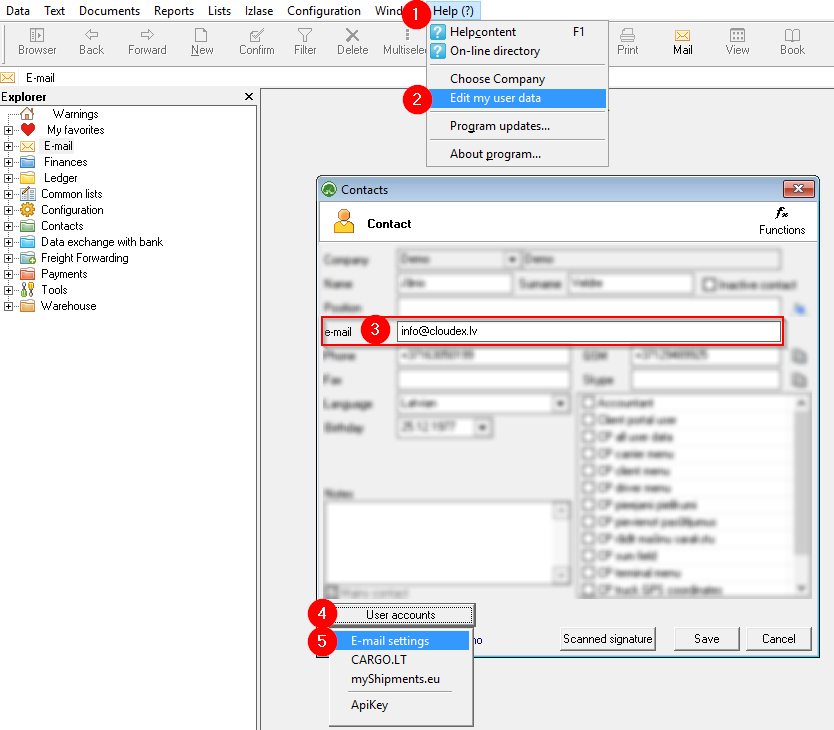
1. Select  in Menu **Help**
2. **Edit my user data**
3. If applicable, complete the user data. <span style="color: #ff0000;">**Make sure that the correct email address is provided!**</span>
4. Click **User Accounts**
5. Select **email SMTP**  
    
    [![image-1665063417019.png](https://ozols.lv/doc/uploads/images/gallery/2022-10/scaled-1680-/image-1665063417019.png)](https://ozols.lv/doc/uploads/images/gallery/2022-10/image-1665063417019.png)
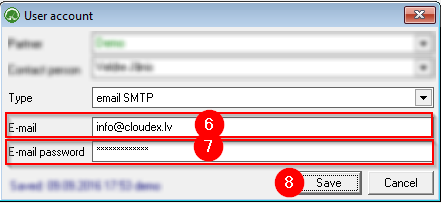
6. Enter your <span style="color: #ff0000;">**business e-mail address**</span>
7. <span style="font-family: -apple-system, BlinkMacSystemFont, 'Segoe UI', Oxygen, Ubuntu, Roboto, Cantarell, 'Fira Sans', 'Droid Sans', 'Helvetica Neue', sans-serif; font-size: 14px; font-style: normal; font-variant-ligatures: normal; font-variant-caps: normal; font-weight: 400;">Enter your <span style="color: #ff0000;">**business e-mail <span style="text-decoration: underline;">password</span>**</span></span>
8. <span style="font-family: -apple-system, BlinkMacSystemFont, 'Segoe UI', Oxygen, Ubuntu, Roboto, Cantarell, 'Fira Sans', 'Droid Sans', 'Helvetica Neue', sans-serif; font-size: 14px; font-style: normal; font-variant-ligatures: normal; font-variant-caps: normal; font-weight: 400;"><span style="font-family: -apple-system, BlinkMacSystemFont, 'Segoe UI', Oxygen, Ubuntu, Roboto, Cantarell, 'Fira Sans', 'Droid Sans', 'Helvetica Neue', sans-serif; font-size: 14px; font-style: normal; font-variant-ligatures: normal; font-variant-caps: normal; font-weight: 400;">Save changes<span style="text-decoration: underline;">  
    </span></span></span>[![image-1665063798442.png](https://ozols.lv/doc/uploads/images/gallery/2022-10/scaled-1680-/image-1665063798442.png)](https://ozols.lv/doc/uploads/images/gallery/2022-10/image-1665063798442.png)

<p class="callout info">If you have questions regarding these instructions, please contact the OZOLS TMS Customer Support team: info@cloudex.lv</p>