# HOW TO CHANGE APPLICATION Callback URL in Azure Portal
#### **1️⃣ Open Azure Portal**
Go to: [https://portal.azure.co](https://portal.azure.com)m
Sign in using a **Global Administrator** or **Application Administrator** account.
---
#### **2️⃣ Open *Microsoft Entra ID***
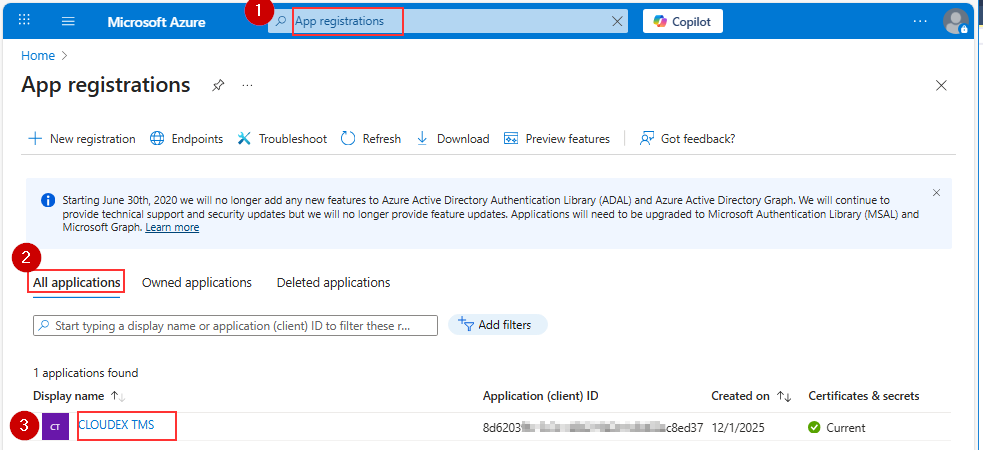
1\) In the left menu, click: **Microsoft Entra ID or Search for App registrations** 2) Open All Applications
3\) Open CLOUDEX TMS application
[](https://ozols.lv/doc/uploads/images/gallery/2025-12/image-1765285865602.png)
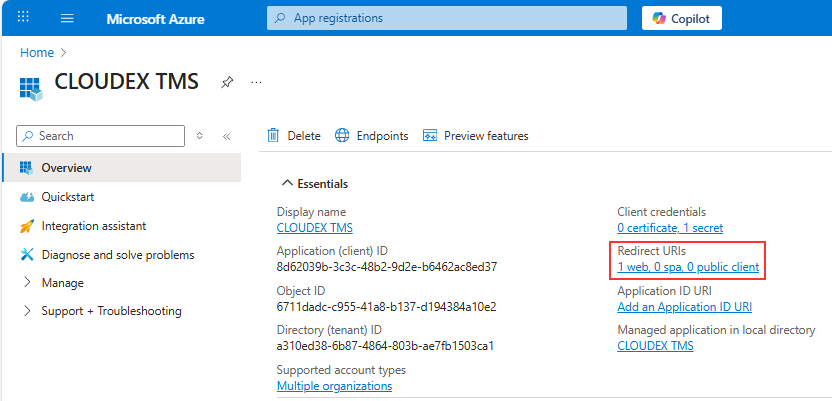
Choose Redirect URLs
[](https://ozols.lv/doc/uploads/images/gallery/2025-12/image-1765286018399.png)
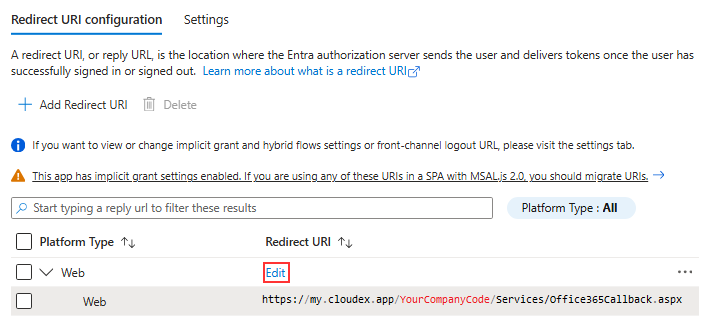
Press edit button and set correct URL
!!!! In YourCompanyCode you should place your company code https://my.cloudex.app/YourCompanyCode/Services/Office365Callback.aspx
[](https://ozols.lv/doc/uploads/images/gallery/2025-12/image-1765286250615.png)
Redirect URL should be under Web NOT under SIngle-application